
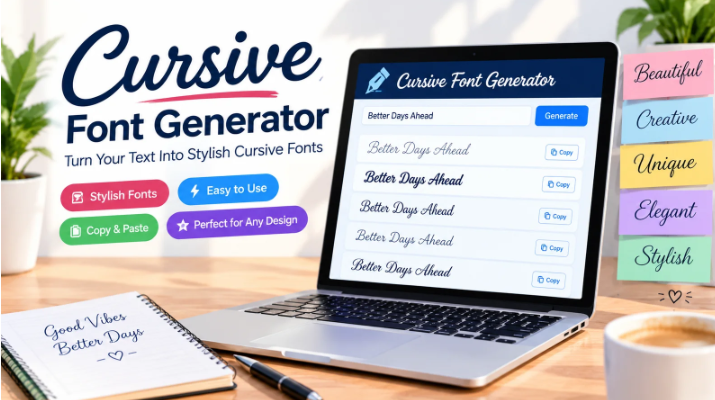
Creative text can make a simple post, profile, design, or message look much more interesting. A Cursive font generator makes it easy to turn regular words into stylish cursive text without needing design skills or special software. These tools are useful for social media profiles, captions, digital artwork, invitations, headings, and many other creative projects.
Cursive lettering has a smooth and handwritten look that can help text stand out. Instead of spending time searching for individual fonts or installing new software, users can enter their text and quickly create different lettering styles. This makes font generators a handy option for anyone who wants attractive text with less effort.
What Is a Cursive Font Generator?
A Cursive font generator is an online tool that changes normal text into decorative lettering inspired by handwritten and script fonts. You simply enter a word, phrase, name, or sentence, and the tool creates several styled versions.
Many generators use Unicode characters to create text that can be copied and pasted into different platforms. This means you may be able to use the generated text on social media, messaging apps, websites, gaming profiles, and other places that support those characters.
Why Use Cursive Text?
Cursive text can give ordinary words a more personal and creative feel. It works especially well when you want your text to look different from standard lettering.
Some common uses include:
Social media usernames and bios
Instagram and Facebook captions
Digital invitations
Personal signatures
Blog headings
Greeting messages
Gaming profiles
Creative artwork
Posters and banners
Decorative names
The main benefit is simple: you can create stylish lettering without learning complicated design software.
How a Cursive Font Generator Works?
Most online font tools are easy to use. The process usually takes only a few seconds.
1. Enter Your Text
Start by typing the word, name, or sentence you want to change. Short phrases usually work best for decorative text.
2. Choose a Style
The generator may provide several script, handwritten, elegant, bold, or decorative options. Try different styles until you find one that matches your purpose.
3. Copy the Result
Once you find a style you like, copy the converted text. Many tools include a copy button so you can use the result immediately.
4. Paste It Where You Need It
Paste the text into your social profile, message, design, post, or other supported platform. It is always a good idea to check how the characters appear after pasting.
Best Features to Look For
Not every font tool offers the same features. A good generator should be simple, quick, and easy to use.
Look for features such as:
Multiple cursive styles
One-click copying
Mobile-friendly design
Free text conversion
Fast results
Easy-to-use interface
Support for different characters
Preview before copying
A clean interface is especially useful because you can focus on the lettering instead of dealing with complicated settings.
Creative Ways to Use Cursive Fonts
There are many ways to include decorative lettering in everyday content. For example, a stylish name can make a social profile more memorable, while cursive headings can give digital invitations a softer appearance.
You can also combine cursive text with normal text. This creates contrast and prevents the entire design from becoming difficult to read. For social media posts, using decorative text for a short heading and regular text for the main message can produce a balanced result.
Designers can also experiment with cursive lettering when creating posters, cards, thumbnails, logos, and other visual content. The right style can support the overall mood of a design.
Tips for Choosing the Right Style
The most attractive style is not always the best choice. Think about where the text will be used before selecting a font.
For professional content, choose a clean and readable script. For invitations or personal messages, a more decorative style may work better. If the text is being used for a username or profile, make sure other users can still recognize the characters.
It is also important to avoid using too many decorative styles in one design. One or two complementary styles are usually enough to keep the content clear.
Cursive Font Generator for Social Media
Social media is one of the most popular places to use stylish text. A unique profile name, short caption, or bio can attract attention when it looks different from ordinary text.
However, compatibility can vary between platforms and devices. Some decorative characters may appear differently depending on the operating system or application. Always preview your text after posting to make sure it looks the way you expect.
Common Mistakes to Avoid
Using decorative text does not automatically make content better. There are a few things to keep in mind.
Avoid extremely complicated lettering when readability matters. Do not use decorative characters for long paragraphs because they can make reading tiring. Also, check whether the platform supports the characters before using them in important content.
For accessibility, standard text is often better for detailed information. Decorative lettering works best when used selectively for short and noticeable parts of your content.
Cursive Font Generator vs. Traditional Fonts
Traditional fonts usually require you to select a font inside a design program, document editor, or website. A generator can be more convenient because it creates copy-ready text directly.
Traditional fonts offer more control over spacing, size, weight, and design. Font generators, on the other hand, are useful when you need quick decorative text without changing the entire design setup.
Both options have their place. Your choice depends on whether you need quick text conversion or detailed design control.
Conclusion
A Cursive font generator is a simple way to create stylish lettering for social media, designs, invitations, profiles, and personal projects. With different script and handwritten styles available, you can quickly turn ordinary words into more distinctive text.
The best results come from choosing a style that fits your content while keeping readability in mind. Whether you need a creative profile name or decorative text for a design, these tools provide a quick and convenient way to experiment with different lettering styles.